Active Slideshow Pro
"Create dazzling multimedia presentations"

Create dazzling multimedia presentations, slideshows and banners with Active Slideshow Pro. This extension builds on the success of Active Slideshow and gives you new spectacular effects and optimal control over your slides, texts, transitions and sounds. Check out the demo.
Features Highlights:
- Customizable overlays and effects
- Free overlays and effects included
- Timed transitions on slides and text
- Easing enables special movement effect
Active Slideshow Pro & Universal CSS Navigation Menu Demos
The demos show a great case how you can have a drop down menu even on top of a flash content
New Demo From The Renowned Photographer Juri Tscharyiski
Active Slideshow Pro is completely rebuild and packed with new features. Among the features are amazing transition effects. Easing will give you full motion control on your transitions. And you can spice up your slideshow with time triggered texts and sound effects per slide.
The zoom and pan effects of Ken Burns are fully controllable. The Ken Burns effect can be combined with other transition effects. The flow of the effects can be controlled with easing and allows effects like accelerated and elastic movements. A new interface in Dreamweaver gives you full control of all the options.
| Features in Detail » |
Features
Optimal control and great effects
With per slide controls and effects you have the freedom to create the optimal slideshow.
Active Slideshow Pro 1.5 offers;
- Customizable overlays and effects
- Make your own stylish borders and lively effects to enhance your slideshow to new heights.
- Free overlays and effects included
- Use one of the supplied overlays or effects to enhance the design of your slideshow, the Flash Source code of the overlays is included.
- Restyled interface
- Active Slideshow Pro has an improved interface with additional options
- New mute button
- The new mute button allows users to turn the sound on or off any time they like. The color of the button is fully customizable.
- Timed transitions on slides and texts;
- You can specify the duration of the slide, the text and the transitions.
- Fantastic effects and transitions on your slides will amaze your audience;
- The slideshow generates an instant user experience by streaming the images and sounds directly. This way the user can enjoy your slideshow instantly even with a low bandwidth connection.
- The slideshows uses a great zoom in and pan effect also know as the Ken Burns effect, furthermore it generates a cool alpha blending effect.
- Fully controllable Ken Burns effects with customizable panning and zoom effects.
- There are great transitions per slide with effects such as Fade, Slide In, Slide Out and Push.
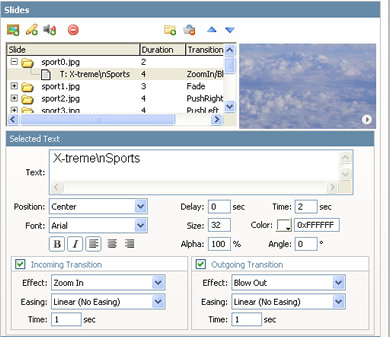
- Great text effects will attract the attention of your viewers;
- Use motion effects like Fade, Blow and Zoom texts to attract you reader's attention.
- Full Text control and new text properties such as alpha, rotation.
- Easing enables special movement effects;
- Apply easing to your transitions. This way you can create effects such as elastic movement, accelerated movement and much more.
- Watermark text;
- Show a text across the entire slideshow;
- Sound and music effects;
- Time triggered sound effects and music per slide;
- Interactivity;
- Add clickable links to your slideshow;
- Open a URL after the slideshow is completed;
- Amazing user experience;
- Apply options across your entire slideshow;
- Define settings such as background color, if the slideshow should loop or not, streaming options, interactivity (links), sound, text and preloader options.
Integrated in Dreamweaver
- Fully integrated in Dreamweaver
- Set your options within user friendly interface, no coding is required
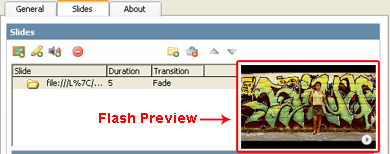
- View the animated Flash preview window to get optimal feedback of your settings per slide;

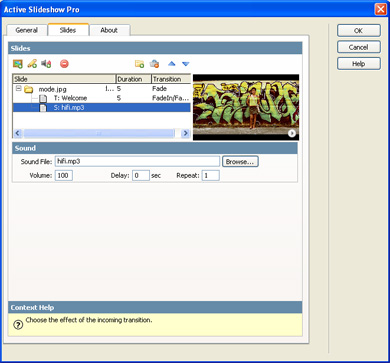
- Add New Slides, Texts and Sounds in one interface;
- Change options per slide such as motion, sound and text effects in an intuitive Dreamweaver interface;

See the importing a folder Flash tutorial >>
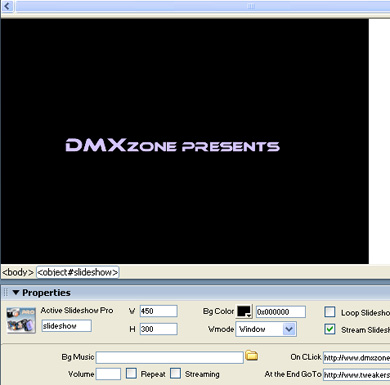
- An inline property inspector;
- The property inspector enables you to change several options after you've created the slideshow;

See Flash demo of the property inspector >>
- Live preview of the total slideshow in Dreamweaver:
- With a single click on the preview button you can see a preview of your complete slideshow.

Automated Features
- Automatically generates and edits the slideshow's XML file;
- The extension creates the slideshow's XML file fully for you! No need to dig in a difficult XML format everything is fully visual now.
- Fit the images in the slideshow
- The slideshow is using a smart imaging technique that enables you to fit the images in the display with the squeeze option;
NEW: Check this great tutorial about how to create a Dynamic Slideshow from your database!
| « Overview | Demos » |
Gallery Chooser Demo
Click one of the following galleries, in order to preview the images.
A great new feature in Activeslideshow Pro 1.5 is the ability to use overlays. Now you can create custom borders around your slideshows to create an enchanting atmosphere. You can even use animated overlays to create effects that make your slideshow come alive like never before! We’ve even included thirteen cool overlays to get you going.
New! Version 1.5 demos with overlays
![]() |
![]() |
![]() |
Celebrity demo
"Cool, easy to use. It's super easy to set up, and I'm happy with the results. See it at my site: www.cybergooch.com. I would recommend it to anybody considering adding a more dynamic show of still images."
- Eric Gooch -
Eric Gooch worked on Blockbusters as the pc game Command and Conquer and the the Playstation 2 hit Ratchet Deadlocked.
User Demos
Demos
![]() |
Flash Tutorials
- General workflow and slide options
- Importing a folder
- The property inspector
- Dynamic XML: Getting your photos from a database
| « Features in Detail | Videos » |
Video
Active Slideshow Pro and Advanced Layer Popup join forces
In this video
we demonstrate how you can create an amazing slideshow that is
displayed in an inline popup that is not blocked by popup blockers.
| « Demos | Requirements » |
| Type: | Suite |
|---|---|
| License: | Details... |
| Product: | Dreamweaver MX 2004, Dreamweaver 8, Dreamweaver CS3, Dreamweaver CS4 |
| « Videos | History » |
Version 1.5.6
- Improved CS4 compatibility
Version 1.5.4
- Fixed a problem that prevented the slideshow from being displayed when the loader of the slideshow was at 100%. This only affected slideshow that used the streaming options.
Version 1.5.3
- Now you can synchronize your animations with your sound (disable streaming for both images and sound to enable them to load before they play).
- Improved Compatibility with Vista
- The extension is now included on the DMXzone tab
- Updated manual, logo and icon.
Version 1.5.2
- Dreamweaver CS3 compatibility
Update Procedure
- You should update all pages that use the Active Slideshow Pro by opening them in Dreamweaver and choosing from the commands menu the action “Update Active Slideshow Pro”
- You will see an alert telling you that the slideshow has been updated successfully.
- Make sure you upload
the new slideshowpro.swf to your live site.
| « Requirements |
George Petrov
George Petrov is the Founder of the highly successful Zones: DMXzone.com, FWzone.net, FLzone.com, CFzone.net, DNzone.com and FlashFiles.nl
He has developed the comprehensive Dynamic Zones Content Management System that is the brains driving them and constantly supports their online communities with his extensive and valuable knowledge.
He is a renowned web development 'Guru' who has written many articles and extension for Adobe's Dreamweaver.
George Petrov is also the CEO and Founder of Dynamic Zones and also very proud of his children Sofie, Victor and Alexander!
User Reviews
Total of 9 reviewsEncore Review
Written by John Schnell on October 30, 2007I posted my first review of Active Slide Show Pro 1.0 in January 2006. I remain a most enthusiastic user! Since then, I have built over twenty-five web sites, each of them using one (or more) Active Slide Shows. I believe Active Slide Show Pro 1.5x ...
RE: Great Product - but it has some warts!
Written by Johnny Blew on February 19, 2007Just wanted to refresh my previous review. They did improve the manual a bit. That's nice to see they respond to their users. In my opinion, for what you get, and compared to the many new options available, this component is substantially ...
RE: Great Product - but it has some warts!
Written by Frank Beverdam on August 17, 2006Hi Johnny, We've updated the manual, please take a look and e-mail me if you have any other suggestions.
A dreamy extension for Dreamweaver
Written by Carole Hamilton on February 1, 2006WOW - Active Slideshow Pro enabled me to implement my client's photo show in record time. I was shaking my head in amazement when I saw the final result. Easy to figure out the simple yet powerful interface, and it quickly produced a snazzy looking ...
active slideshow pro
Written by paul schoenmakers on January 31, 2006This is what I have been looking for ! Using the extension on a website is just as easy as 1,2,3. But even better is the integration in powerpoint. The first slide in my powerpoint presentations is from now on an (active slideshow pro) flash with ...
Active Slideshow Pro
Written by Dave Heggie on January 30, 2006This extension has been fantastic. A word of warning, do not use progressive jps as they do not show in Flash players before 8. George was able to help me out with that and now progressing strongly. Will use this extension whenever I have lots of ...
Five Stars +
Written by John Schnell on January 4, 2006I have purchased over 20 extensions in the last 12 months, and Active Slide Show Pro is by far my favourite.As a professional photographer, I have been dreaming of an easy-to-use extension which would allow me to showcase the images I place on the ...
Nice Extension
Written by Doug Hays on January 2, 2006Works good and makes images much more interesting to view.