Discover the power of interactive presentations – the Sliding Billboard ! Organize your work greatly in a virtual book, which auto scrolls and enables your users to slide from page to page or chapter to chapter naturally. You can present any type of work this way: your portfolio, photo albums, products index, web shop, ads and much more. Choose from the 13 cool CSS designs included, so your billboard always looks great and suites your site perfectly.
13 stylish CSS designs included - Various styles to fit your web site perfectly - see them all
Pure CSS Sliding Billboard - Doesn't require any plugins and works on all modern browsers
Customizable animation - Adjust the Billboard appearance by speed, easing, scroll interval and more
Search Engine Friendly - as the Sliding billboard is pure HTML and CSS code it can be nicely indexed by all search engines and web spiders
Auto Paginating - Quick access to all the pages in the Sliding Billboard
Organize in Sections - Divide your content for a better preview
Add titles and description to each image - An easy way to write description for your images or products
DMXzone Resizer included - Integrated Resizer, so that you don't need to use any additional programs to fit the images to the Billboard
* For complete Features overview press the Featuresin Detail button
Features
13 stylish CSS Designs Included - Various styles to fit your web site perfectly
Lightweight CSS3 Designs - We have chosen to use CSS3 effects like rounded corners and shadows in our CSS designs to make them really pure CSS and very light - so no extra images for many weird css hacks are loaded
Pure CSS Sliding Billboard - Doesn't require any plugins and works on all modern browsers
Customizable animation - Adjust the Billboard appearance by speed, easing, scroll interval and more
Animation easing and speed -
regular sliding is not enough for you? How about bouncing or elastic sliding?
Search Engine Friendly - as the Sliding billboard is pure HTML and CSS code it can be nicely indexed by all search engines and web spiders
Auto Paginating -
Quick access to all the pages in the Sliding Billboard
Organize in Sections - Divide your content for a better preview
Multiple Sections - Divide your content in multiple sections and have a great tabs/menu like navigation between the sections
Add titles and description to each image - An easy way to write description for your images or products
Great title and description hover effects - When displaying images only the title will be shown on top of the image and the description will slide in only when you move with your mouse on top of the image
Multiple Rows and Columns - Enter the desired number of rows and columns and the gallery items will automatically be arranged
Auto generated thumbnails – Auto generate your thumbnails with the correct size while proportions are maintained
DMXzone Resizer included - Integrated Resizer, so that you don't need to use any additional programs to fit the images to the Billboard
Fully customizable - Don't like to supply styles? Well it is all CSS based so you can easily make your own adjustments in the CSS from within Dreamweaver's CSS editor
Fully Controllable by behaviors - You want to navigate to specific position, start or stop the billboard - it can be easily done with the Control Sliding Billboard behavior.
Don't want auto sliding – Well, just set do Not set the Auto Play - and then the user will navigate manually only
Auto anchor navigation - You want to have your own link somewhere else on your page and when the user click on it, the billboard should go to a specific section? Easy just use as link #section_name
Horizontal or Vertical scroll - The choice is yours
Full support for keyboard and mouse wheel navigation (optional)
Customizable Navigation Position - You can choose where you want your section and page navigation top or bottom
Side Navigation buttons - You can also choose if you want to have side navigation arrow buttons, where should they be positioned inside, outside, middle and when; always or only on mouse over (hover)
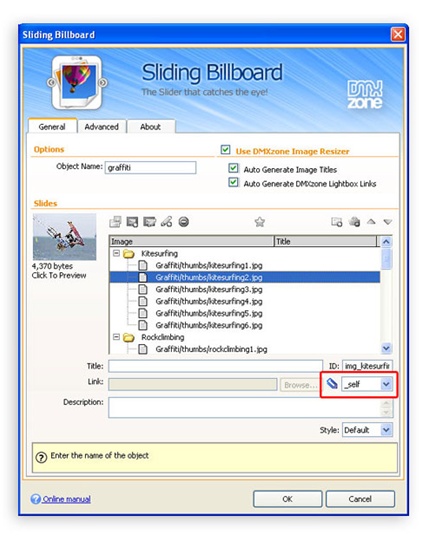
Integrated in Dreamweaver – Interactive dialog in Dreamweaver with all the options you’ll need
An inline property inspector, so that you can easily change visual options later on
Preview in Dreamweaver - You can preview within Dreamweaver how your billboard will look like
Creating Fantastic Billboard slides and Open them in a Lightbox
With this movie we will show you how to combine Sliding Billboard and DMXzone Lightbox in order to create amazing slides which open links in cool popup windows.
Full Dreamweaver CC and Extension Manager CC support
Included new Behavior Connector with restyled UI and better Mac OSX Support
Updated the automatic file copy and update component for better Dreamweaver CC support
Improved compatibility with the latest jQuery
Included latest jQuery 1.10.1
Improved Windows 8 compatibility
Version 1.0.9
Improved Dreamweaver CS6 compatibility
Improved installer for Dreamweaver CS 6.1 (Adobe Creative Cloud) compatibility
Improved javascript file compression for smaller and faster file loading
Version 1.0.8
Improved integration with dynamic data
Improved DW integration
Included the latest mouse wheel plug-in
Latest jQuery 1.7.2 included
Improved installer for DW CS5.5+
Improved DMXzone Behavior Connector and other behaviors from DMXzone extensions
Improved installer for Mac DW CS6
Version 1.0.7
Latest DMXzone Image Resizer included for the best performance
Improved compatibility with newest jQuery 1.6+ versions
Improved mouse wheel handling for the newest jQuery
Included latest jQuery 1.6.3
Optimized source and files for smaller size
Improved automatic shared file copy, synchronization and upload from Dreamweaver
Improved working in Dreamweaver templates
Version 1.0.6
Included new jQuery 1.4.4
Improved depended file includes
Improved includes and cleanup of styles
Version 1.0.5
improved DMXzone Image resizer for Mac OSX and Windows 7
even faster resizing by using all the available cores of the CPU's
Improved working in Dreamweaver templates
Version 1.0.4
Full support for iPad and iPhone!
Now
you can use gestures to fully navigate your Sliding Billboard with
touch on the iPad or iPhone and with mouse sweeps on the regular
computers. You can enable or disable this functionality with the new
“Gestures” option on the Property Inspector.
Great
animation speed improvements
Use Native CSS
Transitions for the fastest animations on WebKit (Safari, Chrome)
browsers.
Use CSS Transforms for hardware accelerated animations
on iPad, iPhone and Safari on the Mac
Updated
CSS Styles
Updated Styles for Opera support of
CSS3 rounded corners and shadows.
Fixed some Webkit CSS styling
Dreamweaver
CS5 Compatible
Version 1.0.3
Improved support for Google Crome and Safari
Improved inserting the JavaScript and CSS files in dynamic pages
Various speed improvements
Version 1.0.2
Browser optimizations:
Initial loading performance optimizations – the Sliding Billboard loads much faster now and it is displayed instantly. No more loading flickering in IE.
Improved compatibility with other frameworks like Prototype and Mootools.
Dreamweaver optimizations:
New method for uploading related files – now when related files are generated by the Sliding Billboard, the user is presented a dialog containing list of new files and with the choice to upload them all at once. No more files to forget to upload.
DMXzone Lightbox code is now only inserted if really used Sliding Billboard
Sliding Billboard works much better now in Dreamweaver templates.
Version 1.0.1
Fixed IE8 error with auto slide
Works great in DW8
Improved compatibility with DMXzone Behavior Connector so you can easily bind your Sliding Billboard with extensions like Flash MP3 Player, Advanced Tooltips and other
Update Procedure:
Just open a page using the Sliding Billboard. You will see a progress bar indicating new files are being copied. After that a dialog will popup with the list of the new files. Depending on if you have remote site defined and you have site synchronization enabled, the files will be automatically synchronized or you will be presented an option to upload all files.
You will need to reedit your existing billboards. Just select each one of them, in the Property Inspector click on the “Slides” button to bring the slides edit dialog. Just click on OK and the Sliding Billboard will be regenerated. Make sure you do that for all your Sliding Billboards. Save and upload your pages and you are done.
George Petrov is a renowned software writer and developer whose extensive skills brought numerous extensions, articles and knowledge to the DMXzone- the online community for professional Adobe Dreamweaver users. The most popular for its over high-quality Dreamweaver extensions and templates.
George is also the founder of Wappler.io - the most Advanced Web & App Builder
I've bought Sliding Billboard a few days ago, and already have it up and running. It makes my site look very professional and sharp. I am having a fun time trying out different ways of working with it.
I had some questions, and used the forum. Patrick, you and Miroslav are good. I got very fast responses. Thank you.
My site still need lots of work, but I am getting there with the help of your great extensions and staff.
I love the easy to understand plug-in works, it is easy to set up and only took me a few minutes to figure out how to use it. The difference it makes to my classifieds website is phenomenal! Thanks DMX


 George Petrov is a renowned software writer and developer whose extensive skills brought numerous extensions, articles and knowledge to the DMXzone- the online community for professional Adobe Dreamweaver users. The most popular for its over high-quality Dreamweaver extensions and templates.