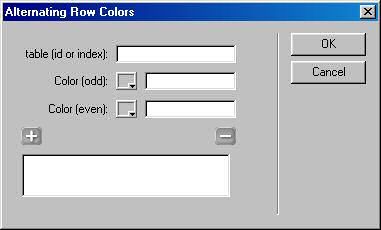
Inserts a script that makes every odd table row one color and every even table row another color for one or more tables.

Overview
UI Access
Behaviors > Add Behavior > Alternating Row Colors
Inserts a script that makes every odd table row one color and every even table row another color for one or more tables.

UI Access
Behaviors > Add Behavior > Alternating Row Colors
I got this to work manually coding the page as follows:
1. Give your table an ID in the properties window (e.g., mytable).
2. Edit the body tag:
<body onload="altRowColors('mytable','#FFFFCC','#e3e7e9')">
3. Edit the table tag:
<table width="80%" border="0" cellpadding="3" cellspacing="0" onfocus="altRowColors('mytable','#FFFFCC','#e3e7e9')" id="mytable">
Substitute colors #FFFFCC and #e3e7e9 as needed.
I got this to work manually coding the page as follows:
1. Give your table an ID in the properties window (e.g., mytable).
2. Edit the body tag:
<body onload="altRowColors('mytable','#FFFFCC','#e3e7e9')">
3. Edit the table tag:
<table width="80%" border="0" cellpadding="3" cellspacing="0" onfocus="altRowColors('finforms','#FFFFCC','#e3e7e9')" id="mytable">
I found the easiest way to automatically alternate the row colors was:
1. Give the table an ID in the Properties window (e.g., mytable)
2. Place this code on the body tag:
<body id="mytable" onload="altRowColors('mytable','#FFFFCC','#738EB5')">
substitute the colors as needed.
The behavior was great as far as generating the code, but it needs a few refinements.