This tutorial takes the user through using the new JDBC connection method for UltraDev's PHP server model PHAkT. This tutorial is a lot shorter than the MyODBC tutorial, as this is a much simpler way to connect. It is aimed at the MAC or PC user.
Using PHAkT v1.0: Connecting to a MySQL Database using JDBC
Using PHAkT v1.0
Connecting to a MySQL Database using JDBC
Connecting to a MySQL Database from within UltraDev can be a little daunting, especially if you're new to UltraDev. There are currently two ways you can do this. The first is using an ODBC connection, and the second is using a JDBC connection.
This tutorial covers the second option, JDBC. If you are a Macintosh user then a JDBC connection is your only option. However, this tutorial applies equally to users of the PC or Macintosh versions of UltraDev.
To complete the tutorial you will need to install the MySQL JDBC Driver. I have designed an extension that makes this process simplicity itself. Download the extension from here , and install it into UltraDev using the Extension Manager. There is nothing to configure, once the extension has installed, restart UltraDev and the JDBC Driver is ready for use.
Done that ? Great. Now we can create that connection !
Start UltraDev and open or create a page. Open the Data Bindings palette (Ctrl+F10, or Window->Data Bindings).
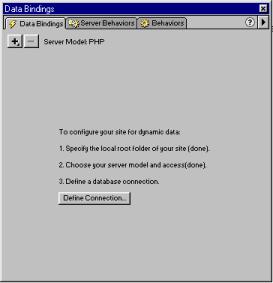
Click on the Define Connection button, and you should get a large window looking like this :-

Use the following points to help you complete this form :-
In the UltraDev Connection Section
- Connection Name: Should always start with 'conn' for example 'connMyDatabase'. This is so that whenever you look at the source code you will know immediately that any occurrence of connMyDatabase refers to your connection.
- DB Type: Should in this instance be set to MySQL. If you now click on the check radio button if nothing happens the MySQL JDBC driver is installed correctly.
- Host: This is the Hostname or IP Address of your MySQL server (I personally always use the IP Address).
- URL: This is where most people make a mistake, in that they replace all of the original value in this box, you should NOT delete this value. The original value in this box will be jdbc:mysql://hostname/DB_NAME. This will be slightly different depending on what you entered in the hostname box. You should replace DB_NAME with the name of the Database you wish to connect to. Remember that this name should not contain any punctuation or spaces.
- User Name: This should be your MySQL Username
- Password: This should be your MySQL Password
In the PHP Connection Section
- dB Type: Should be set to MySQL.
- Host: Should be the Hostname or IP Address of the MySQL Server.
- User Name: Should be your MySQL Username (yes, you have already entered this above)
- Password: Should be your MySQL Password (yes, you have already entered this too).
Why do you have to duplicate the MySQL information ? Well, there are times when you want to work using one server for development, and another server for actual deployment. In these situations, before deploying your site you would edit the connection, and enter the information for your deployment MySQL server in the PHP Connection section above. When you do this the two sets of information will be different.
Once you have completed this form, click on Test. An alert box should pop up saying 'Connection was made successfully'. Click on OK and you are ready to use the Database functions within UltraDev via a JDBC Connection.
Tim Green
 36 Years Old and recently married. Initially started as a COBOL, PASCAL, FORTRAN, ALGOL, 6502 and Z80 Assembly language programmer at age 16.
At age 19 I chased a career in acting where I had a couple of 'Extra' roles and appeared in 'Robin Hood' (no not the Kevin Costner one). Missed out on my big break when I contracted pneumonia which stopped me working on Aliens 3.
Following a 5 year stretch as a casual barman, chef and waiter on Spain's Costa Brava, I returned to the UK where I began work, on a VERY busy IT Support helpline.
Quickly moving through the ranks to Team Leader of Hardware, Software, 2nd level and Principle Support, I finally left after raising the service level from 17% to 98% and getting demoted by way of reward.
CEO of The Rawveg Consultancy, I provide custom extension development services, IT Consultancy, B2B and eBusiness consultancy services.
Comments
Communication Link Error
RE: Communication Link Error
Did you just move the files ? Or did you move the entire folder ? The entire folder should be moved to that location.
Also, are you running a local or remote MySQL server ? The communication link error could point to an incorrect configuration rather than a problem with the driver. For example, if you are using a remote MySQL server, are you sure that Remote Access is enabled ? If it isn't then it is going to cause problems.
Unfortunately, I can't test or reproduce any of this as I don't have access to a MAC. If you continue to get problems try posting your problem to the PHP Forum in the TalkZones where other MAC users could possibly help you out.
Run Time Value
RE: Run Time Value
I'm sorry German, I don't understand what you mean.
If you are looking to use the advanced section of recordset creation then you really should read through the UD manual as (though this is aimed at ASP,JSP and CFML) the procedure is exactly the same.
If it is anything else, then I'm afraid that you will need to make it clearer what information you require.
You must me logged in to write a comment.