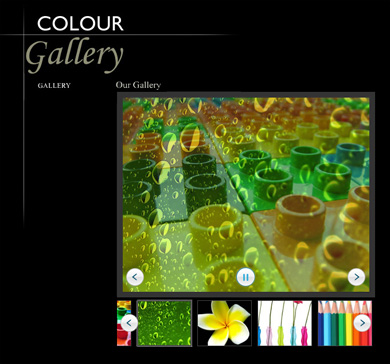
CSS Image Gallery allows you to create cool pure CSS galleries and slideshows with a fluent navigation and image transitions. Due to its CSS nature it is fully customizable and fits in any site design. You can even create a fancy slideshow with automatic thumbnail popup navigation.
The gallery complies with the latest web standards and is fully JavaScript unobtrusive, meaning that the images will always be displayed, even if your users don’t use JavaScript. Therefore this is the ultimate search engine friendly CSS gallery.
The extension has been discontinued, please get CSS Image Gallery 2
Videos
Basic Usage

Creating a Cool Image Gallery that Retrieves Images from a Folder List
With this
movie we will show you how easily you can create your
CSS Image Gallery and have it retrieve its images from a
File Genie PHP/ASP Folder List using Folder List Repeater.
Bundle Usage

Show your Images in a Cool Lightbox
With this
movie we will show you how easily you can show the images from
CSS Image Gallery in
DMXzone Lightbox for greater user experience.

Creating a CSS Image Gallery within a Lightbox
With this
movie we will show you how easily you can use
CSS Image Gallery within
DMXzone Lightbox.

Combine CSS Image Gallery and Advanced Tooltips
With this
movie we will show you how to combine
CSS Image Gallery and
Advanced Tooltips for the best presentation experience of your gallery.

Using the DMXzone CSS Image Gallery and Flash MP3 Player
With this
movie we will show you how easily you can play different sounds for each image using the
DMXzone CSS Image Gallery and
Flash MP3 Player.
History
Version 1.1.5
- Full Dreamweaver CC and Extension Manager CC support
- Included new Behavior Connector with restyled UI and better Mac OSX Support
- Updated the automatic file copy and update component for better Dreamweaver CC support
- Improved compatibility with the latest jQuery
- Included latest jQuery 1.10.1
- Improved Windows 8 compatibility
Version 1.1.4
- Improved integration with dynamic data
- Improved DW integration
- Included the latest mouse wheel plug-in
- Latest jQuery 1.7.2 included
- Improved DMXzone Behavior Connector and other behaviors from DMXzone extensions
- Improved installer for Mac DW CS6
Version 1.1.3
- Greatly improved Safari & Chrome support
- Improved image preloading in the gallery for the fastest visual response
- Updated the mouse wheel support
- Improved Dreamweaver integration
- Optimized file size for faster loading
- Improved extension installation for DW CS5.5+
Version 1.1.2
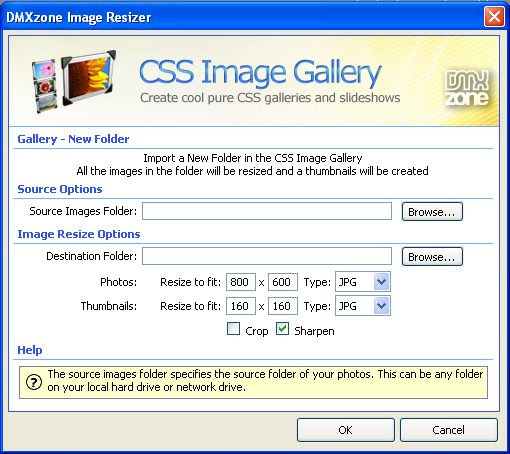
- Latest DMXzone Image Resizer included for the best performance
- Improved compatibility with newest jQuery 1.6+ versions
- Improved mouse wheel handling for the newest jQuery
- Included latest jQuery 1.6.3
- Optimized source and files for smaller size
- Improved automatic shared file copy, synchronization and upload from Dreamweaver
- Improved working in Dreamweaver templates
Version 1.1.1
- Improved initial gallery visibility - now the gallery is shown directly in the right layout
- Smaller JavaScript files by better compression
- Improved jQuery version recognition and include
- Improved related files include method
- Compatibility now with site root relative links Dreamweaver option for making all includes site root relative
Version 1.1.0
- New automatic dependent file updater
- Included new jQuery 1.4.4
- Improved depended file includes
- Improvements with the behavior connector events
- Improved DMXzone Image resizer for Mac OSX
- Improved support for Windows 7
- Even faster resizing by using all the available cores of the CPU's
- Improved working in Dreamweaver templates
Version 1.0.9
- Improved compatibility with Sliding Panels
- Optimized jQuery code to even smaller file size
- Improved compatibility with jQuery 1.4
- Improved Dreamweaver CS5 installer
DMXzone Image Resizer used by CSS Image Gallery in Dreamweaver: - Improved Vista and Windows 7 support for faster image resize with multi threading
- Greatly improved GIF resize support - now colors are quantized for best quality
Version 1.0.8
- Improved IE8 compatibility
- Improved Mouse Wheel scrolling for the thumbnails and main image – scrolling is much smoother now
- Improved DMXzone Resizer for the Mac OSX platform
- Various speed improvements and bug fixes
Version 1.0.7
- Fixed auto scroll to the gallery (giving it focus on load)
- Updated DMXzone Behavior Connector
Version 1.0.6
- Improved the build-in Image Resizer for Mac OSX
- Updated DMXzone Behavior Connector for seamless integration with Advanced Layer Popup and DMXzone Lightbox
- Improved browser support when using Behavior connector events
Version 1.0.5
- New DMXzone Image Resizer included. This is our own super fast,
multithreaded image processor for Dreamweaver, that will resize your
images and make thumbnails in an eye blink. No need for Fireworks any
more.
- Full support of the new DMXzone Behavior Connector : Add
interactive components and behaviors to your CSS Image Gallery such as
Advanced Tooltips, Advanced Layer Popup or Flash MP3 Player.
- Control the CSS Image Gallery with your own customized interface, using behaviors.
- Interface improvements
- Installer Improvements
- New jQuery 1.3.2 included
Update Procedure:
1. Open one page that use the CSS Image Gallery in Dreamweaver
2. Select the CSS Image Gallery on your page and then change something
from the Inspector. Like move the current image selection forward and
then back.
3. You should see some alerts about updated files, make sure you upload these to your live server and you are ready
DMXzone George Petrov is a renowned software writer and developer whose extensive skills brought numerous extensions, articles and knowledge to the DMXzone- the online community for professional Adobe Dreamweaver users. The most popular for its over high-quality Dreamweaver extensions and templates.
George is also the founder of Wappler.io - the most Advanced Web & App Builder
See All Postings From George Petrov >>