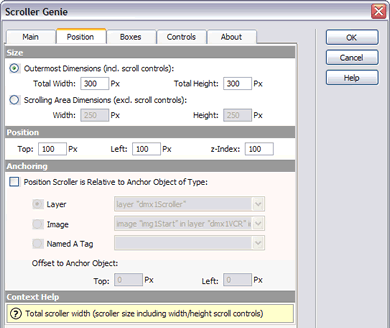
Scroller Genie inserts a DHTML scroller into the current document (vertical or horizontal scrolling), including the required scripts, styles, and HTML elements.
It comes with 14 predefined designs , including their Fireworks or Photoshop source files, and you can easily create your own designs as well.
Questions? Read the FAQ first!
DISCONTINUED
Overview
Most current DHTML scrollers offer only up/down and/or start/stop controls for scrolling. Scroller Genie however offers the following scrolling mechanisms:
- by using back/forth arrows;
- by dragging the scrollbar 'thumb';
- by clicking somewhere in the scrollbar 'slider';
- by activating the scroll controls using the keyboard;
- by using the mouse wheel (IE on PC only);
- by moving the mouse over the scrolling area, where the scrolling speed is dependent on the mouse position ('smart scrolling');
- auto-scrolling, either continuous or with auto-reverse or with pauses.
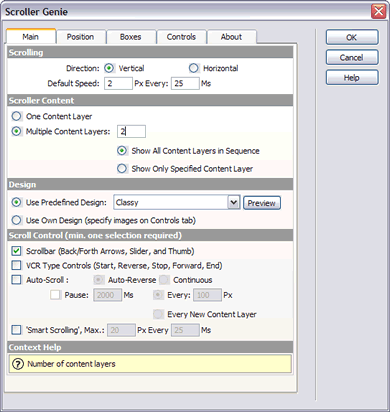
Major features of Scroller Genie:
- Hide scroll controls
Added a behavior to optionally hide the scroll controls (scrollbar and VCR controls) when the scroller content is less than the scroller viewport, so when there's no need to scroll.
- Reload the previous content
This is an accompanying new behavior for the 'Load URL into Scroller' behavior.
It loads the previous content back into the scroller, simulating a history.go(-1) mechanism or usage of the Back button of the browser.
(Note: version 5+ browsers only, and thus not compatible with older browsers like Netscape 4.x!)
- Scroll to named anchor within scroller
Jump to the position of named anchors within the scroller.
(Note: version 5+ browsers only, and thus not compatible with older browsers like Netscape 4.x!)
- One or multiple content layers
Possibility to specify multiple content layers, including choice to view:
* content layers one-by-one (simulating separate 'pages')
* content layers in sequence (simulating one big page).
This last option is especially useful if you want a seamlessly auto-scrolling scroller, eg. with an image gallery.
- Real scrollbar, with draggable 'thumb'
Give your scroller a real scrollbar with draggable 'thumb'. The position of the thumb will give your website visitors an indication of how much scroller content there is. So no more guessing about the length of content to scroll through!
- Auto-Scrolling and Smart Scrolling
Either continuous or with auto-reverse auto-scrolling or with pauses.
Smart Scrolling by moving the mouse over the scrolling area, where the scrolling speed is dependent on the mouse position

see demo >>
- Create Horizontal Scroller or Vertical Scroller
There are predefined professionally designed scroller 'skins' available to choose from.
These predefined designs come with the corresponding PNG or PSD files for editing in e.g. Fireworks or Photoshop, so you can change the colors to fit the color scheme of your website.
 Classy
 Cool Blue
 Glass - yellow
- Make your own scroller
Scroller Genie makes it very easy to specify your own images for the scroll controls, because it calculates the position of all scroller elements based on the images you specify.
- Scroller Genie lets you 'anchor' the scroller
Scroller Genie lets you 'anchor' the scroller to some other object on the page (a DIV, an image or a named anchor), so that it moves with that anchor object when the browser window is resized.
This feature is very useful when you're working with a centered or fluid page layout.
- Load URL into Scroller behavior
Scroller Genie comes with a 'Load URL into Scroller' behavior that lets you replace the scroller content with one click.
This behavior works in most current browsers on PC and Mac (not in Opera 6, and only partly in Opera 7 and Netscape 4.x).
- Exceptional Compatibility
Scroller Genie is tested on a PC to be compatible with all major browsers (IE5+, NS4.x, NS6.2+, Opera6+ and Opera7+).
Scroller Genie is tested on a Mac to be compatible with IE5+, Netscape 4 (no content resize), Netscape 7 and Safari
Requirements
Type: Suite
Product: Dreamweaver 4, Dreamweaver MX, UltraDev 4, Dreamweaver 4.01, Dreamweaver MX 2004, Dreamweaver 7, Dreamweaver 8
Platform: Win XP/2000/2003/2008/7, Mac OS 8.6 or higher
Browser: All
 Well, what's there to tell?
I worked as a software engineer for a well-known Dutch software company for about 10 years. But then I decided I did not want to work there anymore. 
Since then, I've been working with my husband in our own company.
I "discovered" web development early 2000, and I soon found out that I could actually create my own extra (DHTML) features in Dreamweaver by building custom extensions.
My first extension was Cross-browser AutoScroller, but I've developed several other ones since then.
See All Postings From Marja Ribbers-de Vroed >>
Reviews
Hi Another Question Please
After uploading my page to the server. Whenever I load a page that has the scroller genie inserted into it, I get a ie error window that is telling me "Line 92 Error: Object Expected" I click away this box and the error continues to appear whenever I attempt to mouse over the area that contains the scroller genie. My page is http://www.tuffindesign.com
RE: Hi Another Question Please
There are several JS functions missing from your page: eg. MM_preloadImages() and MM_swapImage(), etc..
These are standard Dreamweaver functions and you can bring them back into your page by selecting the HTML element they are applied to and then bringing up their own Behavior dialog and then clicking OK. Dreamweaver will then re-insert those script in the page.
When you have further questions, please use the Scroller Genie support forums at http://www.dmxzone.com/forum/default.asp?NewsId=4952

Getting loads of errors when I work in code view
Hi yea, since I installed your extension I cannot seem to work in the code vie as when I do, like for instand I dont even have your extension applied to a page and I have inserted a dynamic image I wish to change the dynamic image <img src = "<%=(RecTin1.Fields.Item("Image_address").Value)%>"> to a thumb nail by selecting the image going to bindings and changing the format to dmxzone thumb nail, I get the following error in my design view.
');
if(rpw>0){iwh='width="'+rpw+'" ';dwh='width:'+rpw} if(rph>0){iwh+='height="'+rph+'"';dwh+='height:'+rph}
if(tr!=0) pd.write('<span id="IElem" Style="Visibility:hidden;Filter:revealTrans(duration='+trT+');width:100%;height=100%">');
if(isSL&&bdyn) {pd.write(NS4?'<layer id="slide"></layer>':'<span id="slide"></span>')} else {pd.write('<'+'script>show()'+'</'+'script>')}
if(tr!=0) pd.write('</span>');pd.write('
this did not happen before I installed your extension as this is how i have always applied the thumbnail for pure upload images that are being applied to a page.
REgards
Kenny
RE: Getting loads of errors when I work in code view
I think you have some other extension installed that is somehow not compatible with Scroller Genie or more generally with the Dreamweaver version you're using.
Scroller Genie does not mess with server side code on your page, since Scroller Genie is a client side extension. And the text of the error you get is in no way related to Scroller Genie either.
So I'm afraid I really can't help you with this.
When you have further questions, please use the Scroller Genie support forums at http://www.dmxzone.com/forum/default.asp?NewsId=4952
See all 9 Reviews You must me logged in to write a review.