3D ImageFlow Gallery
"Dazzle your viewers with 3D photo navigation"

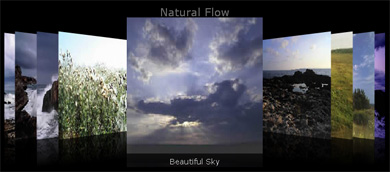
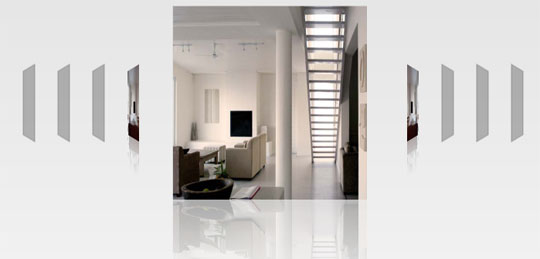
Dazzle your viewers with 3D photo navigation using 3D ImageFlow Gallery. Create an amazing gallery with cool perspective effects in seconds and give your photos stunning 3d and camera effects. Check out the demo.
Add and edit your images directly in Dreamweaver. Interact with other components like the Flash MP3 Player, Advanced Layer Popup or Spry elements and effects to glue everything together.
Features Highlights:
- Create a cool 3D gallery or slideshow in seconds
- Amazing 3D and Camera Effects
- Ultralight Flash gallery player – less than 15KB
- Progressive loading images
- Amazing photo display in perspective
Lefthand Art Cartoons Demo
This demo features an amazing collection of Art Cartoons from the talented and creative cartoon/tattoo artist Teodor Chavdarov. Based in Sofia, Bulgaria, with his natural flare for drawing he turns every cartoon into piece of Art.
| Features in Detail » |
Features in Detail
Bring The Natural Flow To Your Galleries
- Create a cool 3D gallery or slideshow in seconds
- Create a 3D Gallery with fluent transitions in seconds that will amaze your audience.

- Create dazzling 3D reflections and smooth transitions for the best experience
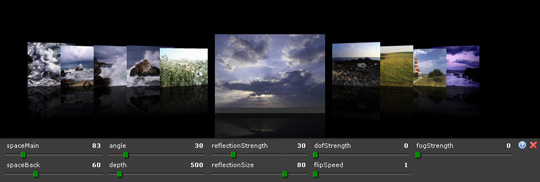
- Get creative and use the full potential of 3D gallery positioning using the Space Main, Space Back, Speed and Angle options.
- New: Amazing 3D and Camera Effects
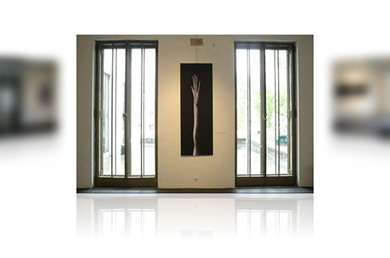
- Depth Of Field is
an effect to mimic camera effects that enable to focus on certain
objects while leaving others blurred. This is great for adding more
depth to your gallery images. See the live effect.

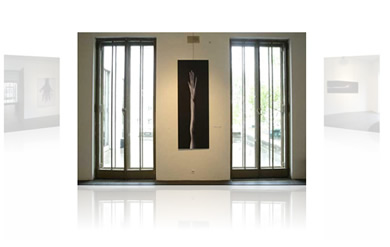
- Distance Fog enhances the perception of distance. See the live effect.

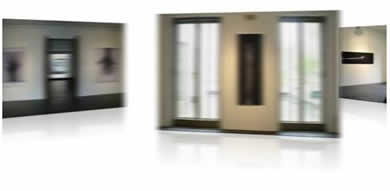
- MotionBlur emphasizes movement and enhances your animated effects. See the live effect.

- Ultralight Flash gallery player – less than 15KB
That's right all these fantastic effects come in an ultra small package.
- Progressive loading of images
Images become visible as soon as they are loaded, so you can start navigating right away, you don't have to wait for the complete gallery to load.

- Great accessibility!
- Full keyboard navigation is at your disposal. Use left and right arrows to navigate to the next/previous photo, PageUp/PageDown to move by 5 at a time and Home and End keys to move to the beginning or to the end of the gallery.
- Use the mousewheel on your pc for the quickest and easiest navigation.
- Fully customizable gallery title, backgrounds and photo descriptions
- You can customize the elements in your gallery so they always fit your site design.
- Add custom description and links to each image.
- Amazing photo display in perspective
Smooth transitions and fantastic reflections for the best experience.
- Full control of your gallery and photos positions
You decide the spacing, angle and depth of the photos in your 3D gallery.
- Interactivity
- Add clickable links to your gallery.
- Real
time customization with amazing online settings panel! Want to tweak
the settings for the best effect - you can do that on your live 3D
gallery - just press F12 (or CTRL+F12 on the Mac) and the customization panel will popup!

- Images are resized while constraining proportions
Original images can be automatically resized to fit the specified size while the proportions are maintained. - Supports multiple image formats
3D ImageFlow Gallery supports, JPGs but also PNGs and Gifs enabling transparent images.
Integrated in Dreamweaver
- Fully integrated in Dreamweaver

- Set your options within user friendly interface, no coding is required.
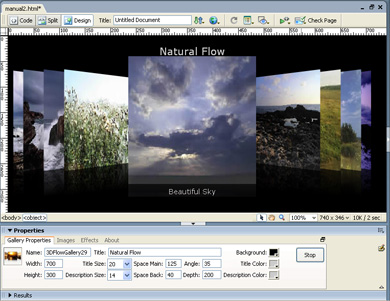
- View the animated preview in your Dreamweaver design view to get optimal feedback of your settings.
- Fully PC and MAC (OSX and Leopard) compatible.
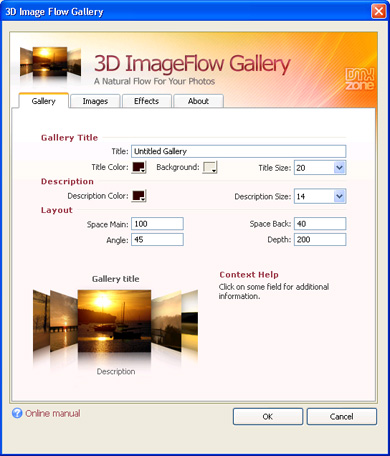
- New generation property inspector with tabs
The property inspector enables you to change several options directly.

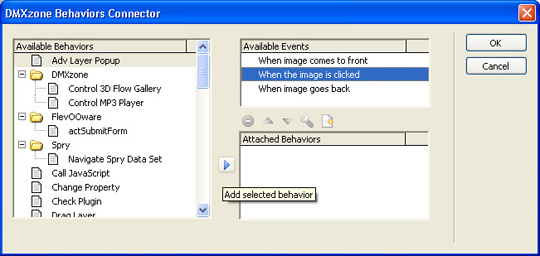
- New: Behaviors connector
The New Behaviors Connector enables you to interact with other page elements, using behaviors. Interact with other components like the Flash MP3 Player or Spry elements and effects to glue everything together.

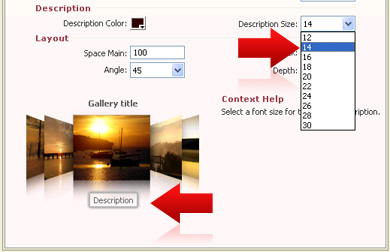
- Cool Interactive inline help
The extension visually describes properties of the extension menu by outlining the selection in the bottom left image;

- Live preview of the total gallery in Dreamweaver
With a single click on the preview button you can see a preview of your complete gallery.

DMXzone does not take responsibility to support the suggested content to be fully compatible and working as intended and does not provide support for extended functionality which is not included in the current release of the extension.
| « Overview | Demos » |
DMXzone Insects Gallery
Click on the images below to see the 3D ImageFlow Gallery in a Lightbox window
Gallery Chooser Demo
Click one of the following galleries, in order to preview the images.
Advanced Layer Popup with 3D ImageFlow Gallery
Create an amazing 3D Gallery with popups that display the larger version of your images. Due to the advanced technology of Advanced Layer Popup, the popups are not blocked.
Demo
Check out how 3D ImageFlow Gallery and Advanced Layer Popup team up to create a cool gallery in a popup window that is not blocked. Get both extensions at a big discount in the 3D Gallery Popup Bundle.An Audio Controlled 3D Gallery With The Art Of Juri Tscharyiski
Flash MP3 Player
now Controls 3D Image Flow Gallery and vice versa. This latest demo
demonstrates that when a new mp3 starts, the gallery switches it's main
image. We've combined Depth of Field, Depth Fog and MotionBlureffects
to create a cinematic experience. Notice that the text on the page
changes and fades in and out when the images in our Gallery are
changed, this is done with the new Behaviours Connector which enables you to interact with other page elements.
Jukebox Demo with new Sound Control Feature
We've combined 3D ImageFlow Gallery and Flash MP3 Player to create an interactive experience that combines sounds and visuals that will amaze your audience!
Updated BeowulF Demo
To show you the different possible gallery styles you can have with 3D ImageFlow Gallery, the BeowulF demo uses a large horizontal canvas that you can explore. The creatures seem to come forward due to the special effects we used.
Tip: When the popup has loaded, click just above the images and press F12 (or CTRL+F12 on the Mac) to play around with the settings of the demo's in a cool control panel.
New User Demo; Great Effects Mixed With Transparent Images
Red Square used a fantastic lit background with transparent images and the new Depth of Field, Depth Fog and MotionBlur effects to create a great banner presentation of their clients.
Other Demos
3D ImageFlow Gallery supports transparency so you can create cut-outs
of your favorite images like we did with the virtual office staff in
the demo below. We used MotionBlur to emphasize the movement when
switching slides. Depth Of Field And Fog Distance where applied to
create the illusion of Depth.
This cool demo with photographs from Juri Tscharyiski
shows cool 100 degree turns of the main image. We used a little bit of
Fog Distance create the illusion of Depth. MotionBlur is applied as a
finishing touch to emphasize the movement, although it is only a
minimal effect in this gallery as the movement is slow and short.
This cool demo from Juri Tscharyiski
features clickable images that shows where the pictures where taken on
Google maps. We used MotionBlur to emphasize the movement when
switching slides. Depth Of Field And Fog Distance where applied to
create the illusion of Depth. Because of the large image size combined
with the motionblur effect, you need a fast pc for this demo.
You can also use the gallery for your icons like in this demo. Tip: if
you add links, you even have a cool navigation menu. MotionBlur is
applied to emphasize the movement when switching slides. Depth Of Field
And Fog Distance where used to create the illusion of Depth.
| « Features in Detail | Videos » |
Creating a 3D ImageFlow Gallery within a Lightbox
With
this movie we will show you how easily you can use 3D ImageFlow Gallery within DMXzone Lightbox

Great Web 2.0 Experience with 3D ImageFlow and Flash Image Enhancer
With this movie we will show you how easily you can combine Flash Image Enhancer and 3D ImageFlow Gallery giving your users the best Web 2.0 look with nice reflections and transition effects.
Load a Dynamic Flash Image Enhanced Photo Based on a URL parameter
With this movie we will show you how easily you can parse a URL parameter from 3D ImageFlow Gallery and load a dynamic image in Flash Image Enhancer based on the parsed parameter.
Combining 3D ImageFlow Gallery and Advanced Tooltips
With this movie we will show you how easily you can display a description of 3D ImageFlow photos in a DMXzone Advanced Tooltip window, all thanks to the amazing DMXzone Behavior Connector that opens up many new possibilities when interconnecting extensions.

Create and Present Your Charts Like Never Before
This video will show you how easy you can create a chart gallery using 3D ImageFlow Gallery and DMXzone Google Charts.

Dynamic Sound Control Easier Then Ever
In this video we will show you how to link your 3D Gallery Images to
your MP3's using 3D ImageFlow Gallery and Flash MP3 Player. After
inserting the gallery and the MP3 player we'll add a behavior and
modify the XML. Note that you need Flash MP3 Player to include sound.

How Does The New Behaviors Connector Work?
This new video tutorial shows you how easy it is to change elements on
your page when the images in your 3D ImageFlow Gallery change. You need
Dreamweaver CS3 to enable the Spry effects in this video.

Setting up a database with phpMyAdmin
If you don't know how to create a Database, check out this video that
shows you how to create a Database with phpMyAdmin.
Creating a Dynamic Gallery
Check out this Video how to Create a Dynamic Gallery. We used PHP as
our server language of choice but if you have ASP, this video will be
just as interesting as the steps will be almost the same.*

| « Demos | Requirements » |
| Type: | Suite |
|---|---|
| License: | Details... |
| Product: | Dreamweaver MX 2004, Dreamweaver 8, Dreamweaver CS3, Dreamweaver CS4, Dreamweaver CS5 |
| Used Technologies: | Flash |
| Screen Shot: | Details... |
| Tags: | 3d gallery, cover flow, image flipping gallery, 3d cover flow, image resizer, flash gallery, reflection, coverflow |
This extension is build for Dreamweaver. There is also a version for the Flash IDE that is designed for building Flash applications. Last but not least there is a Visual Studio .NET version of 3D ImageFlow Gallery.
| « Videos | History » |
Version 1.0.5
- Improved CS4 Compatibility
Version 1.0.4
- The Behavior Connector now allows you to control Advanced Layer Popup
- Improved the gallery behaviors to enhance IE compatibility, with the Control 3DFlow Gallery behavior
- New description field allows longer photo descriptions and HTML formatting
- Improved Dreamweaver MX2004 compatibility
- Various Fixes and Improvements
Version 1.0.2
- Supports interaction with Flash MP3 Player
Version 1.0.1
- Fixed problems with the browser panel that you can access by pressing F12 or CTRL+F12 on your MAC
- Various performance tweaks
- Improved User Interface
Update Procedure
- Open one page that use the 3D ImageFlow Gallery in Dreamweaver
- Select the 3D ImageFlow Gallery Object on your page
- reapply it by clicking on the extension icon from the DMXzone objects panel
- Press the ok button to reapply the extension when the extension dialog pops up
- You should see some alerts about updated files, make sure you upload these to your live server and you are ready.
| « Requirements |
George Petrov
George Petrov is the Founder of the highly successful Zones: DMXzone.com, FWzone.net, FLzone.com, CFzone.net, DNzone.com and FlashFiles.nl
He has developed the comprehensive Dynamic Zones Content Management System that is the brains driving them and constantly supports their online communities with his extensive and valuable knowledge.
He is a renowned web development 'Guru' who has written many articles and extension for Adobe's Dreamweaver.
George Petrov is also the CEO and Founder of Dynamic Zones and also very proud of his children Sofie, Victor and Alexander!
User Reviews
Total of 3 reviewsFabulous
Written by Jan Stephens on January 2, 2010http://www.gospelmelodies.org/portfolio.html Works like a charm!! love it and can see many uses in the future....
Easy to use and Great support!
Written by Klaus Gebhardt on February 13, 2008This is an extremely easy product to use. It works so well in Dreamweaver and adding a gallery takes less than 5 minutes due to the ability to assign folders of images and automatic resize. The support has been extraordinary. When there is a ...
Great Product
Written by Randolph Lee on December 20, 20073D ImageFlow Gallery is an excellent product. I've used many 'slideshow' products, including several from DMX and this one has the best flexibility and simplicity with the greatest effect. Superb and stable!