Add cross browser, great looking fully visual html editor to your sites
Enrich your forms with a fully customizable Online HTML Editor. Build your own CMS in minutes with Advanced HTML Editor 2! Let your users create formatted content without having to know HTML! You can make the editor fit your design by choosing from several predefined designs, add your own style sheets for formatting of the text and more.
Advanced HTML Editor Version 2 is cross browser compatible and offers many new improvements!
This product is Discontinued! Please, get Advanced HTML Editor 3.
Overview
Features Highlight
- Works like a Word Processor
- Exceptional Browser support
- New: Extensive XSS and script cleaning
- Universal undo/redo handling
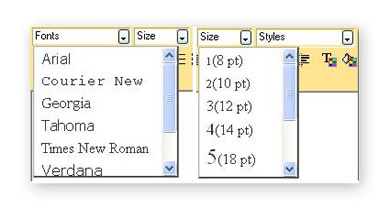
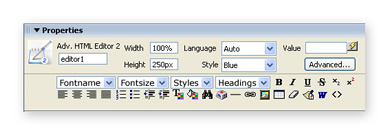
- Visual preview facility for fonts, size and styles
- Fully Customizable Toolbar
- Full Support for DMXzone
Lightbox options in the link dialog
- Display editor dialogs
in stylish popups made with DMXzone
Tooltips
- Add Google Analytics tracking options in the link
dialog
* For complete Features overview press the
Features in Detail button
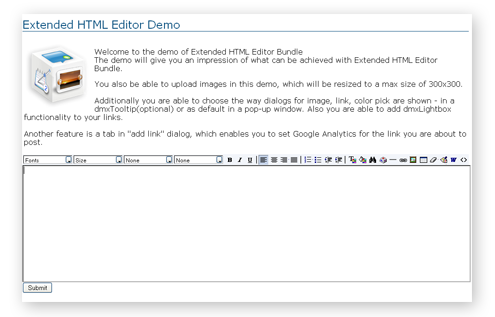
Extended HTML Editor Demo
The demo will give you an
impression of what can be achieved with
Extended HTML Editor Bundle that combines Advanced HTML Editor 2,
Advanced Tooltips
and DMXzone Lightbox
extensions.
Features
Features in Detail
- Full integration with Pure ASP/PHP/ASP.NET Upload extensions for uploading imagesLet users upload images. You need to have the Pure ASP/PHP/ASP.NET Upload extension installed for this feature.
- Use the Smart Image Processor to limit image sizesNow resize the uploaded images. You need to have the Smart Image Processor installed for this feature.
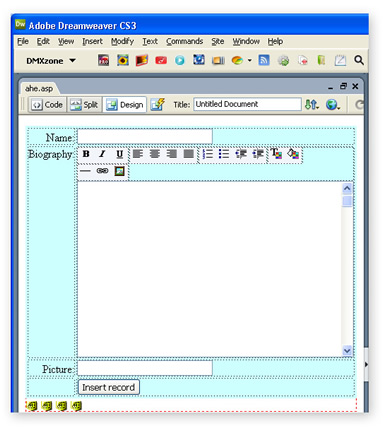
- Integrated with the standard Dreamweaver insert/update record behaviorsThis extension works with the standard insert/update record behaviors in Dreamweaver for easy database integration.
- Let your users create formatted content without having to know any HTML code
Type in any content and with the push of a button change the font to bold, italic, etc. Change the font size and color.
- XHTML Compatible
The Advanced HTML Editor produces html code that is XHTML compliant!
- CSS Styles Support
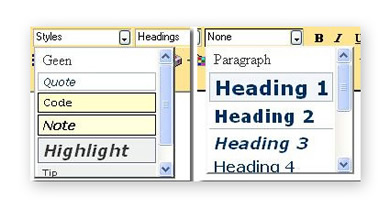
The Advanced HTML Editor picks up all the CSS styles
used on the pages where the editor is on and offers them as choice to
the user!
Showcases
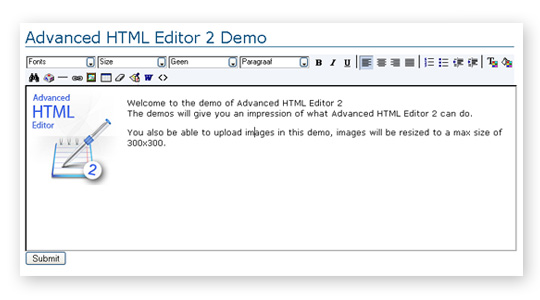
Advanced HTML Editor 2 Demo
Get an impression of what
Advanced HTML Editor 2 can do. Click on the image below and enter any
text with formatting and click on the Submit button to see the result.
You also be able to upload images in this demo, images will be resized
to a max size of 300x300.
Videos
Video
 Richard
Mariner shows you how to use Advanced HTML Editor 2 to add and edit
articles on your website. You can add your own text, images and markup
editing your website has never been this easy!
Richard
Mariner shows you how to use Advanced HTML Editor 2 to add and edit
articles on your website. You can add your own text, images and markup
editing your website has never been this easy!
Watch the Video 
Download
the free 20 page tutorial on building a password-protected Content
Management System using Dreamweaver server behaviours and Advanced HTML
Editor!
Requirements
Type: Suite
Product: Dreamweaver MX 2004, Dreamweaver 8, Dreamweaver CS3, Dreamweaver CS4, Dreamweaver CS5/CS5.5 and CS6
Browser: IE 6, IE 7, Firefox 3.6+, Opera 9.5, Safari 3, Chrome 9+, IE 8, Safari 4+
Tags: html,editor,dreamweaver
History
Version 2.0.11
What's new:
- Full Support for DMXzone
Lightbox options in the link dialog
- Display editor dialogs in stylish popups made with DMXzone Tooltips
- Add Google Analytics tracking options in the link dialog
Improved:
- Improved Safari and Chrome support
- Fully restyled and improved link, image and other dialogs
- Images and links are now autoselected after insertion
- Rewritten color picker to be javascript generated
- Added support for the latest Smart Image Processor ASP 2.5.5 (it is
required now)
- Now all bold/italic and underline styles are done with css styles
- Rewrote image link dialog for improved parameter handling
- Improved toolbar buttons styling
- Improved linking & selection of images
- Safari image selection improvements
- Improved CMS integration
Fixes:
- Fixed showing initially html codes on Safari and Chrome
- Added compressed version - now minified with YUI
- Fixed char popup insert in IE
- Fixed images with links support on safari
- Fixed image replacements with links
- Improved cleanup of the Apple-style-span class only not the whole
span
Version 2.0.9
- Extensive
XSS and script cleaning - all vulnerable malicious scripts are removed
before submitting so that you end up with clean JavaScript code
- Improved Word code cleaning
Version 2.0.7
- Improved enter handling in Firefox,
- Insert and update images in Safari now possible (also with the Addon Gallery)
Version 2.0.6
- Exceptional Browser support, the editor now supports Safari 3, Opera 9.5, Internet Explorer 6+ and Firefox 2+
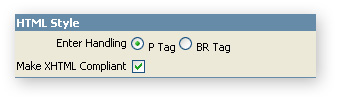
- Universal enter handling; choose if you want to use <P> or <BR> tags when the user presses enter in the editor
- Major improvement in load times; we've updated the interface to load faster, so it only has to load one image instead of 27 separate icons
- The script has been greatly optimized and compressed so it just over 50kb now
- Now works with Pure ASP Upload 3 for uploading files and Smart Image Processor ASP 2 and PHP 2
- Greatly improved Dreamweaver Integration
- Improved Installer, Dreamweaver CS4 compatibility
- Compatible with the DMXzone Updater
Update Procedure
- If you use the AddOns for Advanced HTML Editor 2, install the addon
first then (re)-install the latest version of Advanced HTML Editor 2.
- Please remove the previous version completely in Extension Manager and then install the new version.
DMXzone George Petrov is a renowned software writer and developer whose extensive skills brought numerous extensions, articles and knowledge to the DMXzone- the online community for professional Adobe Dreamweaver users. The most popular for its over high-quality Dreamweaver extensions and templates.
George is also the founder of Wappler.io - the most Advanced Web & App Builder
See All Postings From George Petrov >>
Reviews
Worth the upgrade!!
Really great this new version! Very cool and awesome that users can see the CSS and Fontstyles directly from the pop-up menu!
Another great feature is that this will work on Firefox as good as on IE. And if you get in mind how Firefox is growing...
And, of course, many things are better and it looks that is is faster than ever before! A really 'must-have update'!
Advanced HTML Editor 2.0.4 update.
At last George is giving us a free update to this great product. Now I have a simple question having been burnt by 2.0.2 -> 2.0.3.
Can anyone tell me how to go about installing the FREE 2.0.4 update? I have 2.0.3 installed. Do I un-install that first?
RE: Advanced HTML Editor 2.0.4 update.
You can just install it over the previous version. Then restart DW, complete the install wizard, restart again. Update your pages that use the editor by opening them in Dreamweaver, making a minor change and saving the page. You will see an alert telling you that the Script files have been updated. Make sure you upload the files to the live site
Version 2.0.6 update
HTML style Enter handling: simple but very usefull!
Saves me the time and effort to explain users to use Shift-Enter for a breaking rule <br>.
Thanks!
You must me logged in to write a review.