No matter where on the planet you are, the calendar speaks your language - supports 35 languages.
DMXzone Calendar Manual
Add a great looking calendar with many different styles and effects on your sites
The DMXzone Calendar extension enables you to add a great looking
calendar with many different styles and effects on your sites. Enrich
any form used for events, appointments or birthdays. Use it as a date
picker or inline calendar with its unique design and in flight
animation options. Embed multiple calendars, select date ranges, and
limit the selection to specific dates.
No matter where on the planet you are, the calendar speaks your language - supports 35 languages.
No matter where on the planet you are, the calendar speaks your language - supports 35 languages.


Advanced: Styling the Calendar Entry Field
Introduction
One very important option that we have in
the Property Inspector is the Behaviors. In this chapter we're going to
attach a DMXzone showtooltip behavior to the Calendar to show the date that the
user selects.
Open the Property Inspector
Click on the already created calendar to achieve that.

1. Notice the Name/ID of the calendar which is dmxCalendar_1
2. Go to the CSS panel and click on the "New
CSS Rule" icon
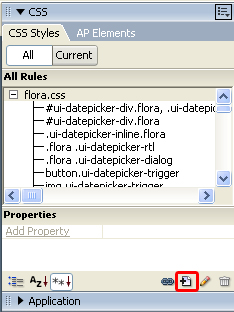
3. A new popup
appears. Select "Advanced (IDs, pseudo-class selectors)" under Selector Type
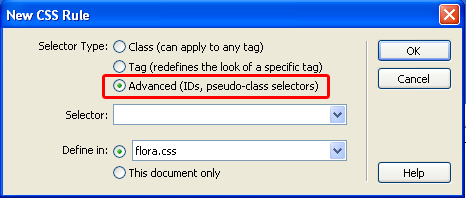
4. Now we write in the Selector field
# and the ID of the calendar, in our case #dmxCalendar_1
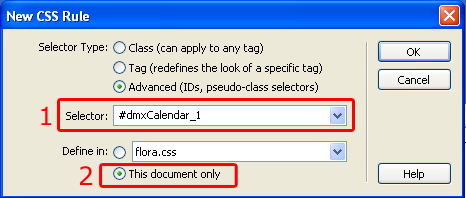
Secondly, select where these settings are to be applied. We choose This document only.
- A new dialogue pops up.
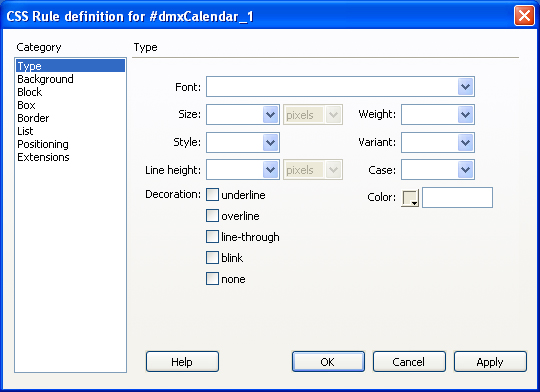
Here you can fully customize your entry field's font, background, block, box, border, list, positioning, and extensions.