Display all your events, appointments, reservations or availability in a stylish event Calendar. Get your event data from many different sources such as own database or Google Calendars and show it all in a single calendar! Daily, Weekly, Monthly or full Year views are available to fully suite your needs. The Calendar is completely Ajax based so when navigating to the next or previous week/month it fully loads its data dynamically without refreshing the page! Choose from the 11 great looking CSS designs to style the calendar so it fully fit in your site design.
Ajax Event Calendar Manual
Dynamic Agenda for all your Web Apps


Display Types
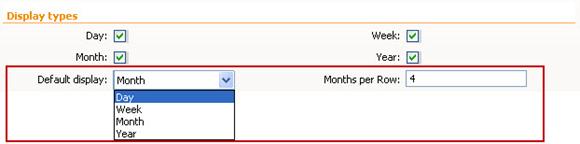
- Day/Month/Week/Year display – Choose whether to show or hide day, Monty, Week and year display types.

- Default display and Months per Row – You can select the default display for your Calendar as well as the months per row display when a calendar is open.
Date & time Settings
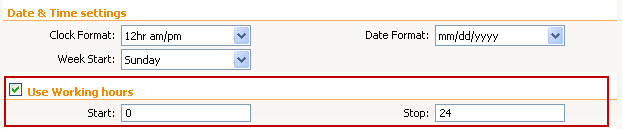
- Clock Format – Select the clock format for day/week views and event times.

- Date Format – Select the format to use for dates in the Calendar interface.

- Week start – Select the day to use as the first day of the week.

Working Hours/Animation transitions
- Use working hours – Enter the start hour of the working hours (0-23h) and the stop hour (1-24).
- Animated Transitions – Use sliding animation when going to previous/next date. The duration needs to be set in milliseconds and the easing can be linear or swing.
